What Is AWS?
AWS stands for Amazon Web Services. It is a cloud computing platform provided by Amazon.
AWS allows individuals, businesses, developers, organizations, and governments to access IT resources on demand. Instead of purchasing physical servers and building all the required infrastructure, users can create and manage resources through AWS services.
Cloud computing generally involves accessing IT resources such as computing power, storage, and databases through the internet, often using a pay-as-you-go model. ([AWS Documentation][2])
For example, instead of buying a physical server to host a website, a business can use cloud computing resources to run its application.
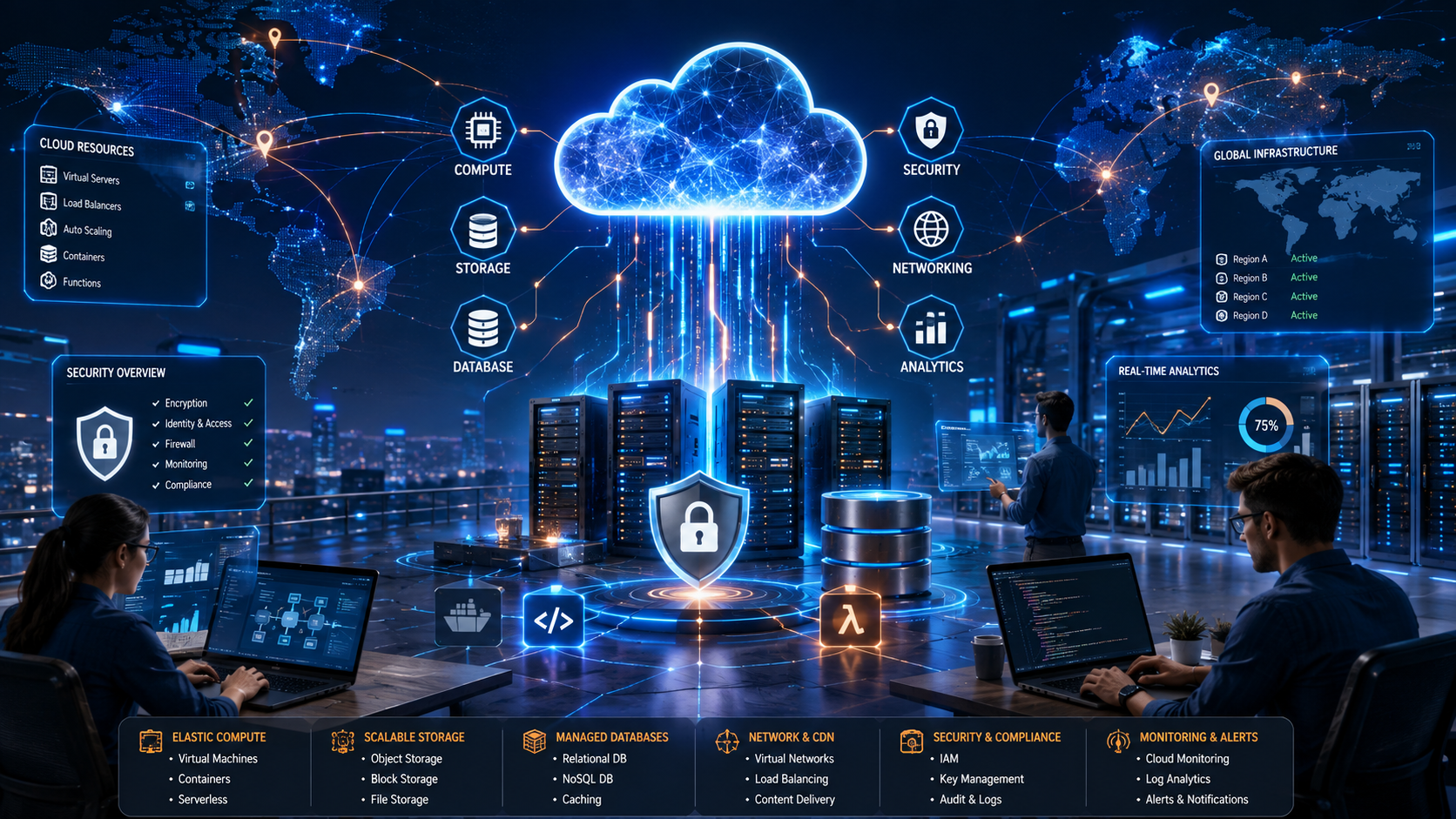
AWS provides services for many different purposes, including:
- Computing
- Cloud storage
- Databases
- Networking
- Security
- Content delivery
- Analytics
- Artificial intelligence and machine learning
- Application development
AWS offers a large and continually evolving collection of cloud services and tools across these categories. ([AWS Documentation][3])
How Does AWS Work?
AWS operates large-scale cloud infrastructure and makes computing resources available to customers through its platform.
Users can create and configure resources based on their needs. Depending on the service, this may include selecting computing capacity, creating storage, setting up databases, configuring networking, and managing access permissions.
Imagine that you want to launch a website.
A simplified traditional approach might require you to:
- Buy a physical server.
- Find a location for the server.
- Set up networking equipment.
- Install and maintain the operating system.
- Replace or upgrade hardware when necessary.
- Plan for increased traffic.
With AWS, you can instead provision cloud resources when needed. This can reduce the need to purchase and maintain your own physical infrastructure. Cloud computing also allows resources to be adjusted as requirements change. ([AWS Documentation][1])
Important AWS Services for Beginners
AWS has many services, but beginners do not need to learn everything at once. Understanding a few core services is a good starting point.
Amazon EC2
Amazon Elastic Compute Cloud (EC2) provides resizable computing capacity for running workloads.
You can think of EC2 as a way to use virtual servers in the cloud. Depending on your needs, you can choose different types of computing resources and configurations. ([Amazon Web Services, Inc.][4])
EC2 can be used for:
- Hosting websites
- Running applications
- Software testing
- Development environments
- Business workloads
Amazon S3
Amazon Simple Storage Service (S3) is an object storage service.
It can be used to store and retrieve data, including files, images, backups, application data, and other digital content.
For example, a website or application may use cloud storage to store uploaded images or documents.
Amazon RDS
Amazon Relational Database Service (RDS) helps users work with managed relational databases.
Databases are important for applications that need to store structured information such as customer records, product information, account details, or other application data.
A managed database service can reduce some of the administrative work involved in operating database infrastructure.
AWS IAM
AWS Identity and Access Management (IAM) is used to manage access to AWS resources.
Security is an important part of cloud computing. IAM helps control who or what can access specific AWS resources.
For example, an organization may give one employee permission to view information while giving an administrator additional permissions to manage certain services.
AWS VPC
Amazon Virtual Private Cloud (VPC) allows users to create and configure isolated virtual networking environments within AWS.
Networking settings can control how resources communicate with one another and how they connect to the internet.
Although networking can seem complex at first, understanding concepts such as IP addresses, subnets, routing, and security rules can be valuable when learning AWS.
What Are AWS Regions and Availability Zones?
AWS operates infrastructure in different geographic locations around the world.
A Region is a geographic area where AWS provides infrastructure. Within Regions, AWS uses multiple Availability Zones, which are designed as separate locations that can help organizations build more resilient applications. AWS’s global infrastructure continues to expand across multiple geographic Regions and Availability Zones. ([Amazon Web Services, Inc.][5])
This infrastructure can allow organizations to deploy applications closer to users and design systems with redundancy.
For example, an organization may use resources across multiple Availability Zones to reduce the impact of certain infrastructure failures.
The specific architecture required depends on the application, budget, security requirements, and desired level of availability.
The Benefits of AWS and Cloud Computing
AWS and cloud computing offer several important benefits.
1. On-Demand Resources
Instead of waiting to purchase and install physical hardware, cloud resources can often be provisioned when needed.
This can help developers and organizations start projects more quickly.
2. Scalability
Cloud resources can be adjusted as requirements change.
For example, a website that normally receives a small amount of traffic may need additional computing resources during a major promotion or event.
Cloud infrastructure can make it easier to increase or decrease resources based on demand. ([Amazon Web Services, Inc.][6])
3. Flexible Pricing
Many cloud services use usage-based pricing models.
However, pay-as-you-go does not mean every service is automatically cheap. Costs depend on the resources you use, how long you use them, data transfer, storage, and other factors.
Understanding pricing is therefore an important part of using AWS responsibly.
4. Global Infrastructure
AWS provides infrastructure across multiple geographic locations, allowing organizations to deploy services in different parts of the world. ([Amazon Web Services, Inc.][5])
This can help businesses support users in different locations and design more resilient applications.
5. A Wide Range of Services
AWS provides services for many areas of technology, including computing, storage, databases, networking, security, analytics, and AI. ([AWS Documentation][3])
This means a developer can potentially build a complete cloud-based application using services from one platform.
Understanding AWS Security
Security in the cloud is a shared responsibility.
AWS is responsible for operating and securing the underlying cloud infrastructure, while customers are responsible for properly configuring and securing the resources and data they use.
For example, if you create a cloud storage resource and accidentally make sensitive information publicly accessible, the problem may result from incorrect configuration.
Good AWS security practices include:
- Using strong passwords.
- Enabling multi-factor authentication.
- Following the principle of least privilege.
- Managing access through IAM.
- Regularly reviewing permissions.
- Protecting access credentials.
- Monitoring cloud resources.
- Keeping systems properly configured.
Security should be considered from the beginning of an AWS project rather than added as an afterthought.
How Much Does AWS Cost?
AWS does not have one fixed price because it offers many different services and pricing options.
The amount you pay can depend on factors such as:
- The services you use
- The amount of computing power required
- Storage usage
- Data transfer
- Geographic location
- The length of time resources remain active
AWS provides pricing information, calculators, and introductory offers or free usage options for eligible services and accounts. Before creating resources, it is important to understand the pricing rules and monitor your usage. ([Amazon Web Services, Inc.][5])
One common beginner mistake is creating cloud resources for testing and forgetting to stop or delete them when they are no longer needed.
Who Should Learn AWS?
AWS can be useful for people working in many areas of technology, including:
- Cloud computing
- Cybersecurity
- Software development
- Web development
- Networking
- System administration
- DevOps
- Data analytics
- Artificial intelligence and machine learning
You do not need to become an expert in every AWS service. A beginner can start by learning basic cloud concepts and then focus on services related to a particular career path.
For example, someone interested in cybersecurity may focus more on IAM, cloud security, logging, and network security. A web developer may begin with computing, storage, databases, and deployment tools.
How Can Beginners Start Learning AWS?
A good learning path can include:
- Understand cloud computing fundamentals.
- Learn basic networking concepts, including IP addresses, DNS, and virtual networks.
- Explore core AWS services such as EC2, S3, IAM, and VPC.
- Practice with small projects rather than only watching tutorials.
- Learn AWS security basics.
- Understand pricing and cost management.
- Use official documentation and learning resources.
AWS provides documentation, tutorials, cloud fundamentals resources, and training materials for learners. ([Amazon Web Services, Inc.][5])
A practical project, such as hosting a simple website or storing files securely, can help turn theoretical knowledge into real experience.
Final Thoughts
AWS is a cloud computing platform that provides on-demand access to a wide range of technology services. Instead of building and maintaining all physical IT infrastructure themselves, users can access computing power, storage, databases, networking, security tools, and other resources through the cloud.
For beginners, AWS can initially seem overwhelming because of the large number of available services. The best approach is to start with the fundamentals.
Learn what cloud computing means, understand basic networking and security concepts, and become familiar with important services such as EC2, S3, IAM, RDS, and VPC.
AWS skills can be valuable in many areas of technology, including software development, cybersecurity, cloud engineering, networking, and DevOps. By starting with the basics and building practical experience gradually, beginners can develop a strong foundation in cloud computing.
For official documentation and learning resources, visit Amazon Web Services (AWS).
Frequently Asked Questions (FAQ)
1. What does AWS stand for?
AWS stands for Amazon Web Services, Amazon’s cloud computing platform.
2. What is AWS used for?
AWS is used for computing, storage, databases, networking, security, analytics, application development, AI, and many other technology services. ([AWS Documentation][3])
3. Is AWS free?
AWS offers some free and introductory usage options, but AWS services can generate charges depending on what you use. Always review pricing and monitor your resources.
4. Is AWS difficult to learn?
AWS can seem complex because it offers many services. Beginners can make learning easier by starting with cloud fundamentals and a small number of core services.
5. What is Amazon EC2?
Amazon EC2 is a cloud computing service that provides configurable computing capacity for running applications and workloads. ([Amazon Web Services, Inc.][4])
6. What is Amazon S3?
Amazon S3 is an object storage service that can be used to store and retrieve files and other data.
7. What skills do I need before learning AWS?
Basic knowledge of computers, networking, operating systems, security, and the internet can be helpful, but beginners can learn AWS while developing these skills.
8. Is AWS useful for cybersecurity?
Yes. Cloud security is an important area of cybersecurity, and understanding services such as IAM, networking, access control, monitoring, and cloud infrastructure can be valuable.