Understanding Ethernet: A Beginner’s Guide
What Is Ethernet?
Ethernet is a technology used to connect devices within a local area network, commonly called a LAN.
An Ethernet connection typically uses a physical network cable to transfer data between devices. For example, you can connect a computer to your router using an Ethernet cable.
Once connected, the computer can communicate with other devices on the network and access the internet through the router.
A typical Ethernet setup may look like this:
Internet → Modem or ONT → Router → Ethernet Cable → Computer
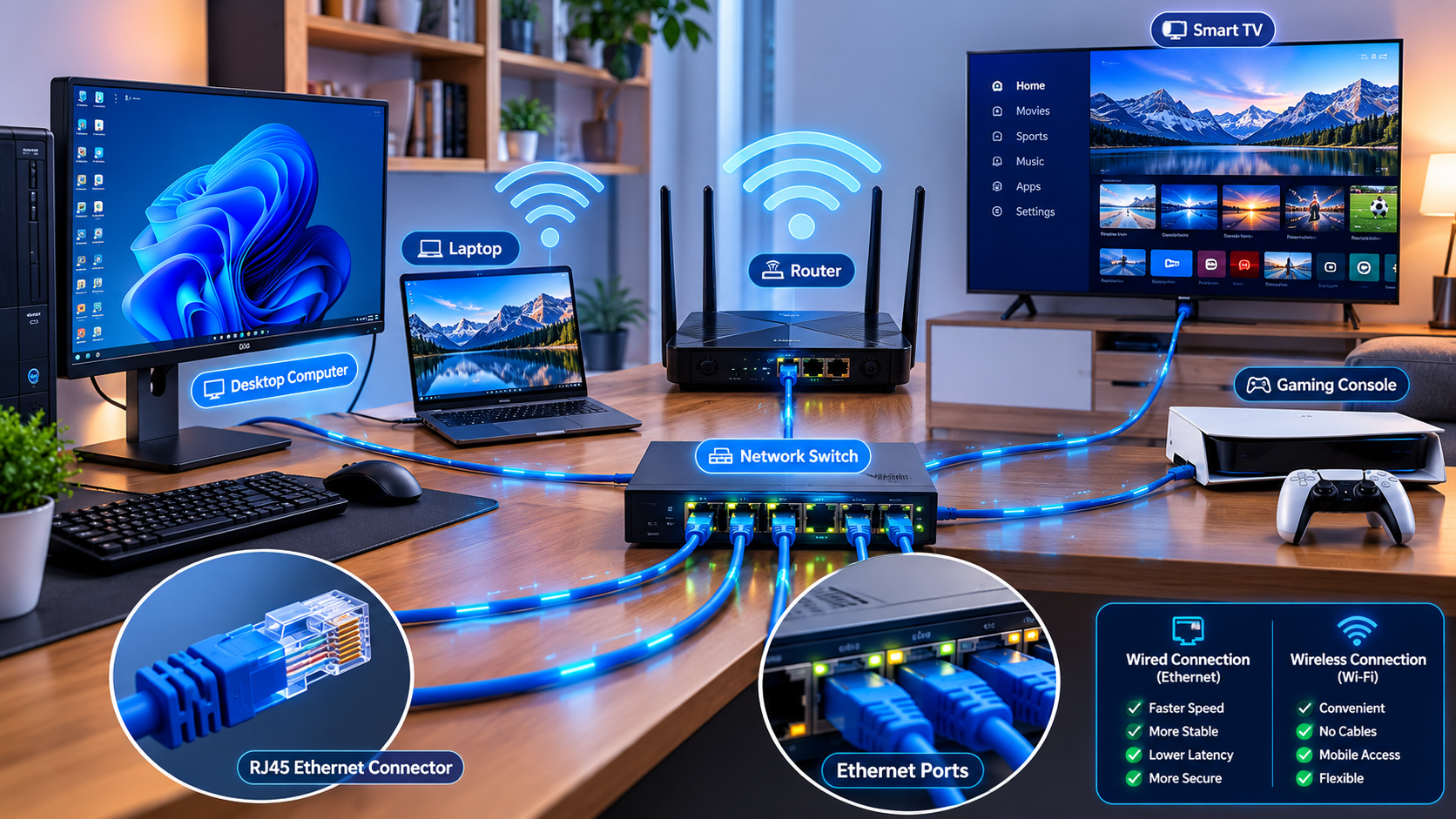
In a larger network, additional devices called network switches can provide more Ethernet ports and allow multiple devices to connect.
Ethernet is widely used because it provides a direct and stable connection between network equipment.
How Does Ethernet Work?
Ethernet transfers digital information through a physical connection.
When you open a website, download a file, or stream a video, your device sends and receives data through the Ethernet cable. The data travels between your computer, router, switch, and other network equipment.
Ethernet networks use standardized communication methods so that compatible devices from different manufacturers can communicate with one another.
For example, a laptop connected through Ethernet can communicate with a printer, network storage device, or another computer connected to the same local network.
The router can then direct internet traffic between your home network and your internet service provider.
Ethernet vs. Wi-Fi
Both Ethernet and Wi-Fi can connect devices to the internet, but they work differently.
Ethernet
Ethernet uses a physical cable.
Advantages include:
- Stable and reliable connections
- Low latency
- Fast local network speeds
- Less affected by wireless interference
- Better performance for stationary devices
The main disadvantage is that your device must be physically connected to the network.
Wi-Fi
Wi-Fi uses radio signals instead of physical cables.
Advantages include:
- Convenient and wireless
- Supports mobile devices
- Allows users to move around freely
- Easy to connect smartphones and tablets
However, Wi-Fi performance can be affected by distance, walls, interference, network congestion, and router placement.
For this reason, Ethernet is often preferred when stability and consistent performance are important.
Common Uses of Ethernet
Ethernet can be useful for many devices.
* Desktop Computers
A desktop computer usually remains in one location, making Ethernet a practical option. A wired connection can provide reliable internet access for work, browsing, video calls, and large downloads.
* Gaming Consoles
Online gaming can benefit from a stable connection and low latency. Connecting a gaming console directly to a router or network switch may provide a more consistent experience than a weak or congested Wi-Fi connection.
* Smart TVs
Streaming high-quality video can use a significant amount of network bandwidth. If a smart TV is located near a router or Ethernet connection, a wired connection can help provide a stable connection.
* Workstations
People who regularly upload or download large files, participate in video meetings, or access network resources may benefit from Ethernet.
* Servers and Network Storage
Devices such as servers and network-attached storage systems often use Ethernet because they need dependable and fast communication with other devices.
Understanding Ethernet Cables
Ethernet cables are commonly identified using categories such as Cat5e, Cat6, Cat6a, Cat7, and Cat8.
The word Cat means category.
Different cable categories are designed to support different network requirements.
* Cat5e
Cat5e, meaning Category 5 Enhanced, is widely used and can support Gigabit Ethernet under appropriate conditions.
It is suitable for many homes and basic office networks.
* Cat6
Cat6 is a newer category that can support higher network performance than older cable standards under appropriate conditions.
It is commonly used in modern home and office installations.
* Cat6a
Cat6a is designed for higher-performance networking and can support 10 Gigabit Ethernet over longer distances than standard Cat6.
It is often used in professional or high-performance network environments.
* Cat7 and Cat8
Cat7 and Cat8 cables are designed for more specialized and higher-performance networking applications.
However, buying the highest-numbered cable does not automatically make your internet faster. Your router, switch, network adapter, internet plan, and other equipment must also support the speeds you want to achieve.
For many homes, Cat5e or Cat6 may be sufficient.
What Is an Ethernet Port?
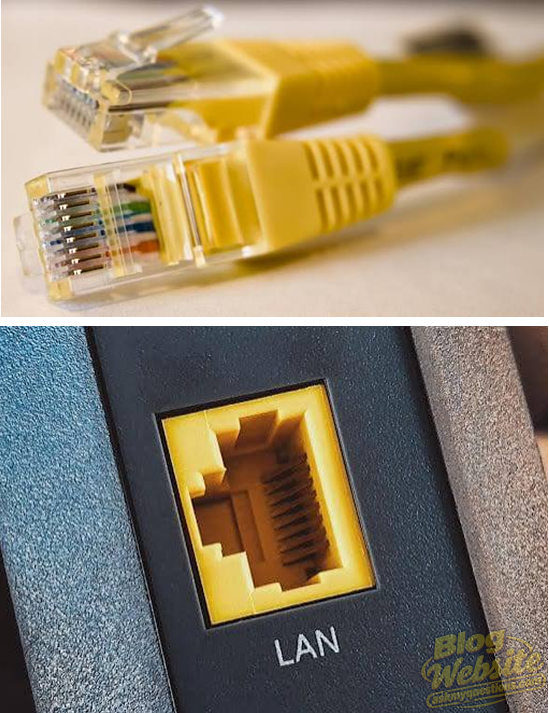
An Ethernet port is the physical socket where an Ethernet cable connects to a device.
You can find Ethernet ports on many:
- Routers
- Desktop computers
- Laptops
- Gaming consoles
- Smart TVs
- Network switches
- Access points
A typical Ethernet port is wider than a standard telephone connector and is designed for an RJ45-style network plug commonly used with twisted-pair Ethernet cables.
Some modern thin laptops do not include a built-in Ethernet port. In such cases, a compatible USB-to-Ethernet adapter or docking station may provide a wired network connection.
Understanding Ethernet Speeds
Ethernet supports different connection speeds depending on the equipment and network standard.
Common examples include:
- 100 Mbps
- 1 Gbps (1,000 Mbps)
- 2.5 Gbps
- 5 Gbps
- 10 Gbps
To achieve a particular speed, multiple parts of the network must support it.
For example, if your computer has a 1 Gbps Ethernet port but your router only supports 100 Mbps on that connection, your wired network connection may be limited by the slower component.
Similarly, a fast Ethernet connection inside your home does not automatically mean your internet service will provide the same speed.
Your actual internet speed depends on your internet service plan and connection quality.
Does Ethernet Make Your Internet Faster?
Ethernet does not automatically increase the maximum speed provided by your internet service provider.
For example, if your internet plan provides up to 50 Mbps, connecting your computer with a high-speed Ethernet cable will not automatically increase the plan to 500 Mbps.
However, Ethernet may help your device make better use of the available connection.
If your Wi-Fi signal is weak, congested, or affected by interference, a wired Ethernet connection may provide more consistent performance.
Ethernet can also provide very fast communication between devices on your local network, such as transferring files between computers or accessing a network storage device.
Ethernet Switches
A router may only have a limited number of Ethernet ports.
If you need to connect additional wired devices, you can use an Ethernet switch.
A switch connects to your router and provides additional Ethernet ports.
For example:
Router → Ethernet Switch → Computer, Smart TV, Gaming Console
This allows several wired devices to communicate with the local network and access the internet through the router.
When choosing a switch, make sure its supported network speed is suitable for your needs.
How to Connect a Device Using Ethernet
Connecting a device through Ethernet is usually simple.
- Locate an available Ethernet port on your router or network switch.
- Connect one end of the Ethernet cable to the router or switch.
- Connect the other end to your computer, TV, gaming console, or other compatible device.
- Wait for the device to detect the connection.
- Check your network settings to confirm that Ethernet is connected.
In many cases, the connection works automatically without requiring additional configuration.
If the connection does not work, check that the cable is securely connected and try another Ethernet port or cable.
When Should You Use Ethernet?
Ethernet is especially useful when you need:
- A stable connection
- Low latency
- Consistent network performance
- Fast local file transfers
- A reliable connection for stationary devices
Wi-Fi is usually more convenient for smartphones, tablets, and devices that move around the home.
Many homes use a combination of both technologies. For example, desktop computers and smart TVs may use Ethernet, while phones and tablets connect through Wi-Fi.
Final Thoughts
Ethernet is a reliable networking technology that uses physical cables to connect devices to a local network and the internet. While Wi-Fi provides convenience and mobility, Ethernet can offer greater stability, lower latency, and more consistent performance.
It is particularly useful for stationary devices such as desktop computers, gaming consoles, smart TVs, servers, and network storage systems.
When choosing an Ethernet cable, remember that the cable alone does not determine your network speed. Your router, switch, device network adapter, and internet plan can all affect performance.
For many homes, using Ethernet for important stationary devices while using Wi-Fi for mobile devices can provide an excellent balance between performance and convenience.
KEYNOTES
1. What is Ethernet used for?
Ethernet is used to connect devices to a local network and the internet through a wired connection.
2. Is Ethernet faster than Wi-Fi?
Ethernet can provide more consistent and reliable performance because it is not affected by wireless signal strength and interference in the same way as Wi-Fi.
3. Does Ethernet improve internet speed?
Ethernet does not increase the maximum speed provided by your internet plan, but it can help provide a more stable connection and reduce Wi-Fi-related performance problems.
4. What Ethernet cable should I use at home?
For many home networks, Cat5e or Cat6 cables are suitable. The best choice depends on your equipment and network requirements.
5. Can I use Ethernet and Wi-Fi at the same time?
Yes. A home network can use both Ethernet and Wi-Fi connections. Different devices can connect using whichever method is most appropriate.
6. What is an Ethernet switch?
An Ethernet switch is a networking device that provides additional wired ports, allowing multiple devices to connect to a local network.
7. What does 1 Gbps Ethernet mean?
It means the Ethernet connection can support a theoretical link speed of up to 1 gigabit per second, provided the connected equipment and network support that speed.
8. Do all laptops have Ethernet ports?
No. Many thin and modern laptops do not have built-in Ethernet ports, but a compatible USB-to-Ethernet adapter or docking station can provide a wired connection.
Interested in Learning More? Explore our in-depth guides by clicking the highlighted links throughout this article, or browse our blog for additional tutorials, tips, and resources. You’ll find practical information to help you expand your knowledge and stay informed. VISIT WWW.ASKMYQUESTIONS.COM