How to Check a Domain Owner with WHOIS
WHOIS is a publicly accessible database that stores registration information about internet domain names. When someone registers a domain through an accredited registrar, certain registration details are recorded and can be queried using a WHOIS lookup service.
Originally, WHOIS records often displayed the registrant’s name, address, email address, and phone number. Today, many of these details are hidden or replaced with privacy-protection information due to data protection laws and privacy services.
Even with these changes, WHOIS records still provide valuable technical and administrative information about a domain.
Why Use a WHOIS Lookup?
A WHOIS lookup can help you:
- Verify whether a website is legitimate.
- Check when a domain was registered.
- See when a domain expires.
- Identify the domain registrar.
- Determine the domain’s name servers.
- Research websites before making purchases.
- Investigate suspicious or fraudulent websites.
- Troubleshoot domain management issues.
Whether you’re registering a domain, buying from an unfamiliar website, or investigating a phishing attempt, WHOIS can provide useful insights.
What Information Can WHOIS Show?
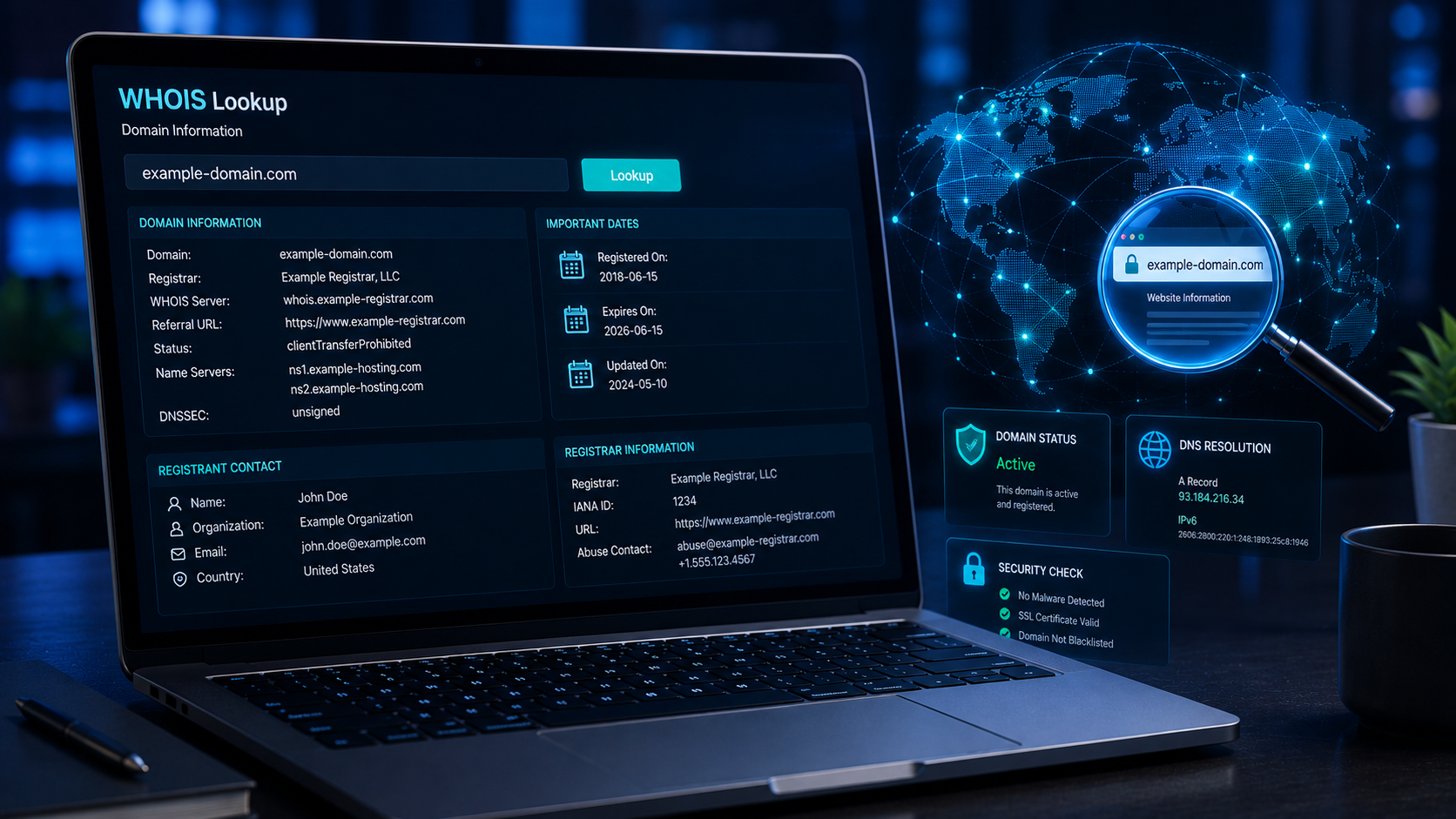
Depending on the domain and privacy settings, a WHOIS lookup may include:
| Information | Description |
|---|---|
| Domain Name | The registered website address. |
| Registrar | The company through which the domain was registered. |
| Registration Date | When the domain was first registered. |
| Expiration Date | When the current registration expires. |
| Last Updated Date | The most recent modification to the registration. |
| Name Servers | Servers responsible for directing visitors to the website. |
| Domain Status | Administrative status codes that indicate how the domain is managed. |
| Registrant Contact | May be hidden or replaced with privacy information. |
Not every WHOIS record contains all of these fields, especially when domain privacy protection is enabled.

How to Check a Domain Owner Using WHOIS.com
Follow these simple steps to perform a WHOIS lookup:
Step 1: Open WHOIS.COM
Visit the WHOIS lookup page using your web browser.
“WWW.WHOIS.COM“
You’ll see a search box where you can enter a domain name.
Step 2: Enter the Domain Name
Type the domain name you want to investigate.
Examples include:
- example.com
- example.org
- mybusiness.net
“Do not include https:// or additional page paths“.
Step 3: Start the Search
Click the WHOIS or Search button.
The website will retrieve the domain’s registration information.
Step 4: Review the Results
The WHOIS record will display the available registration details.
Look carefully at:
- Registration date
- Expiration date
- Registrar
- Name servers
- Domain status
- Contact information (if publicly available)
Understanding WHOIS Results
*Registration Date
This shows when the domain was originally registered.
A domain that has existed for many years may appear more established than one registered only a few days ago. However, domain age alone does not determine whether a website is trustworthy.
*Expiration Date
This indicates when the current registration period ends.
Website owners typically renew their domains before they expire.
*Registrar
The registrar is the company that manages the domain registration.
Examples include major domain registrars and web hosting providers accredited to sell domain names.
*Name Servers
These servers direct visitors to the correct web hosting service.
Changes to name servers often occur when a website changes hosting providers.
*Domain Status
Status codes indicate how the domain is managed.
For example, a domain may be locked with a Domain Transfer Lock (also known as a registrar lock) to prevent unauthorized transfers or changes, helping protect the domain from theft, hijacking, or accidental modifications until the owner intentionally unlocks it.
Can You Always See the Domain Owner?
Not always.
Many domain owners use WHOIS privacy protection, which replaces personal information with the contact details of a privacy service.
Privacy protection helps reduce:
- Spam emails
- Identity theft
- Unwanted marketing
- Harassment
As a result, many WHOIS records no longer display the registrant’s personal information.
How WHOIS Helps Detect Suspicious Websites
WHOIS information can be useful when evaluating unfamiliar websites.
Warning signs may include:
- Very recently registered domains.
- Missing or incomplete registration information (where applicable).
- Short registration periods.
- Frequent ownership changes.
- Inconsistent contact details.
These signs do not automatically indicate fraud, but they may justify further investigation.
Always combine WHOIS information with other checks, such as reading customer reviews, verifying HTTPS encryption, and confirming that the business provides legitimate contact information.
Limitations of WHOIS
Although WHOIS is a valuable research tool, it has limitations.
It cannot:
- Guarantee that a website is trustworthy.
- Reveal hidden ownership details protected by privacy services.
- Detect malware or phishing directly.
- Show the complete history of a domain’s ownership.
WHOIS should be viewed as one part of a broader website verification process.
Final Thoughts
WHOIS is one of the most useful tools for researching domain names and learning more about the websites you visit. Although privacy protections now limit the amount of personal information displayed for many domains, WHOIS still provides valuable details such as registration dates, expiration dates, registrars, and name servers.
Whether you’re investigating a suspicious website, checking your own domain, or verifying an online business, a WHOIS lookup is a quick and effective way to gather important information. Combined with other security checks, it can help you make safer decisions while browsing the internet.
KEYNOTES
1. What is WHOIS?
WHOIS is a public database that provides registration information about internet domain names, including details such as the registrar, registration dates, and domain status.
2. Can I see the owner’s name for every domain?
No. Many domain owners use privacy protection services, and data protection laws may limit the personal information shown in WHOIS records.
3. Is a recently registered domain always suspicious?
Not necessarily. Many legitimate websites are newly created. However, if a new domain also shows other warning signs, it is wise to investigate further.
4. Is WHOIS information always accurate?
WHOIS records are maintained by registrars, but inaccuracies can occur. Some information may also be hidden due to privacy protection.
5. Can WHOIS tell me if a website is safe?
No. WHOIS provides registration details, but it does not assess whether a website is secure or trustworthy. Always use additional security checks before sharing personal or financial information.
Interested in learning more? Explore our in-depth guides by clicking the highlighted links throughout this article, or browse our blog for additional tutorials, tips, and resources. You’ll find practical information to help you expand your knowledge and stay informed.