Understanding Wi-Fi Bands: 2.4 GHz, 5 GHz and 6 GHz
What Is a Wi-Fi Band?
A Wi-Fi band is a range of radio frequencies used by wireless devices to communicate with a router or access point.
Your Wi-Fi router sends and receives data using radio signals. Different Wi-Fi bands use different frequency ranges, each with its own strengths and limitations.
The three bands commonly discussed today are:
- 2.4 GHz
- 5 GHz
- 6 GHz
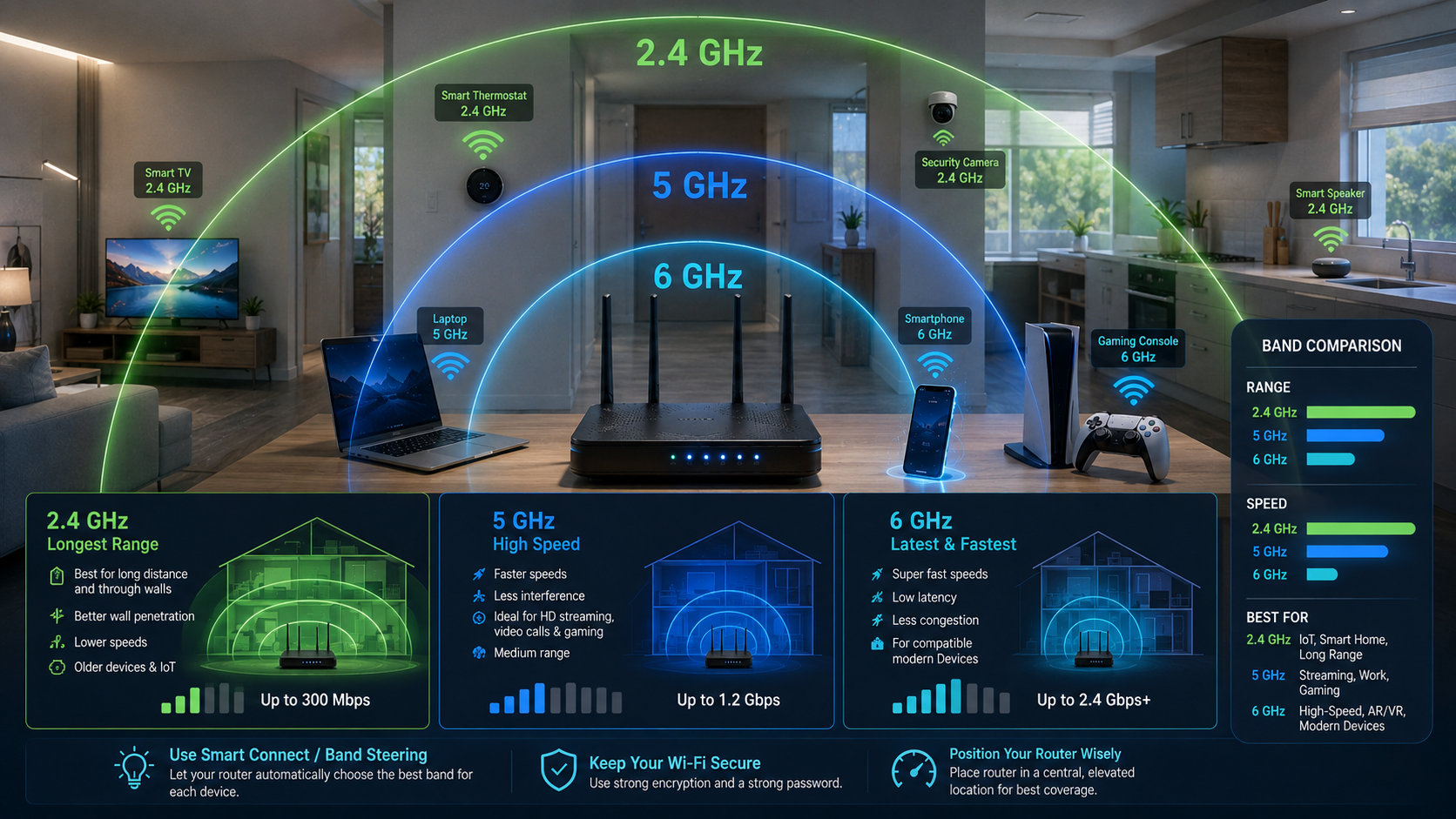
Generally, lower-frequency signals can travel farther and may pass through some obstacles more effectively. Higher-frequency bands can offer greater capacity and performance but often have shorter effective range.
However, actual Wi-Fi performance also depends on factors such as the router, Wi-Fi standard, channel width, interference, walls, connected devices, and the internet connection itself.
Understanding the 2.4 GHz Wi-Fi Band
The 2.4 GHz band has been used by Wi-Fi devices for many years and remains widely supported.
One of its biggest advantages is its range. A 2.4 GHz signal can generally travel farther than higher-frequency Wi-Fi signals and may perform better when there are walls and other obstacles between your device and the router.
This makes 2.4 GHz useful for devices located farther away from the router.
Advantages of 2.4 GHz
- Generally provides better range.
- Can work better through walls and obstacles.
- Supported by many older devices.
- Useful for devices located farther from the router.
Disadvantages of 2.4 GHz
The 2.4 GHz band is also used by many other wireless technologies and devices. Depending on your environment, this can contribute to interference or congestion.
For example, the band may be shared by:
- Nearby Wi-Fi networks
- Bluetooth devices
- Some wireless accessories
- Certain smart home devices
Because of this congestion, the 2.4 GHz band may not always provide the best speeds.
A device such as a smart camera or smart home sensor may work perfectly on 2.4 GHz, while a laptop located close to the router may benefit more from a higher-frequency band.
Understanding the 5 GHz Wi-Fi Band
The 5 GHz band is commonly available on modern dual-band and tri-band routers.
Compared with 2.4 GHz, 5 GHz generally offers more available spectrum and can support faster wireless connections under suitable conditions.
It is often a good choice for activities such as:
- Streaming high-quality video
- Online gaming
- Video calls
- Large file downloads
- General high-speed internet use
Advantages of 5 GHz
- Can provide faster Wi-Fi performance.
- Often experiences less congestion than 2.4 GHz.
- Supports more available channels.
- Suitable for high-bandwidth activities.
Disadvantages of 5 GHz
The main limitation is range. A 5 GHz signal generally does not travel as far as a 2.4 GHz signal and may be weakened more by walls and other obstacles.
For example, 5 GHz may provide excellent performance in the same room as your router but become weaker in a distant bedroom.
Understanding the 6 GHz Wi-Fi Band
The 6 GHz band is used by newer Wi-Fi technologies, including Wi-Fi 6E and newer compatible systems.
Because this band is newer, it can provide access to additional wireless spectrum for compatible devices. This can help reduce congestion in environments where older Wi-Fi bands are crowded.
However, both your router and your device must support the appropriate technology to use 6 GHz Wi-Fi.
Advantages of 6 GHz
- Access to additional wireless spectrum.
- Can provide excellent performance for compatible devices.
- May experience less congestion from older Wi-Fi equipment.
- Useful for modern, high-performance networks.
Disadvantages of 6 GHz
Like 5 GHz, the 6 GHz band generally has a shorter effective range than 2.4 GHz and can be affected by walls and obstacles.
It also requires compatible hardware. An older smartphone or laptop may not be able to connect to a 6 GHz network.
2.4 GHz vs. 5 GHz vs. 6 GHz
Here is a simple comparison:
| Wi-Fi Band | Range | Potential Speed | Interference | Best For |
|---|---|---|---|---|
| 2.4 GHz | Longer | Generally lower | Often higher | Distant devices and wider coverage |
| 5 GHz | Medium | Generally higher | Often lower | Streaming, gaming, and nearby devices |
| 6 GHz | Shorter | High potential | Can be lower | Compatible modern devices and high-performance use |
These are general comparisons. Real-world performance depends on your equipment, location, and network conditions.
Why Does My Router Show Multiple Wi-Fi Networks?
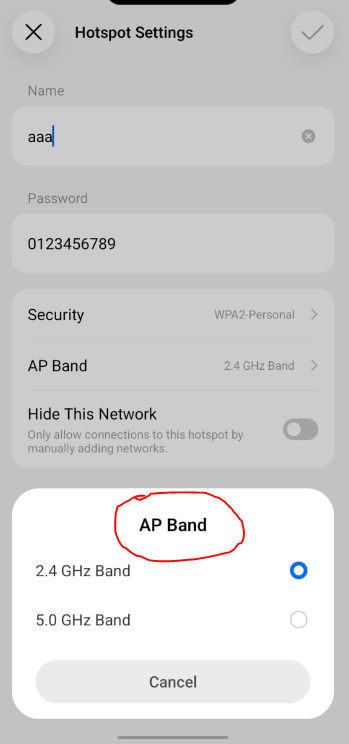
Some routers broadcast separate network names for different Wi-Fi bands.
For example, you may see:
- MyWiFi
- MyWiFi-5G
The first may use 2.4 GHz, while the second uses 5 GHz.
Some routers also use a feature called band steering. Instead of creating separate network names, the router can use one Wi-Fi name and automatically guide compatible devices toward an appropriate band.
This can make network management easier because you do not have to manually choose between multiple Wi-Fi networks.
Which Wi-Fi Band Should You Use?
The best band depends on where you are and what you are doing.
Use 2.4 GHz When:
- You are far from the router.
- There are several walls between you and the router.
- You need better coverage.
- You are connecting older devices.
- You are using many smart home devices.
Use 5 GHz When:
- You are relatively close to the router.
- You need faster Wi-Fi performance.
- You are streaming video.
- You are playing online games.
- You are making video calls.
- Your local 2.4 GHz network is congested.
Use 6 GHz When:
- Your router and device both support it.
- You are relatively close to the router or access point.
- You want access to newer Wi-Fi capacity.
- Your environment has significant congestion on older bands.
How Walls and Distance Affect Wi-Fi
Wi-Fi signals do not pass through every material equally.
Your connection may be affected by:
- Concrete walls
- Brick walls
- Metal surfaces
- Floors and ceilings
- Large furniture
- Water and aquariums
As you move farther away from the router, the signal becomes weaker.
Higher-frequency bands such as 5 GHz and 6 GHz can be more affected by distance and obstacles than 2.4 GHz. This is one reason why a device may automatically switch bands or experience different speeds in different rooms.
If you have weak coverage throughout parts of a large home, improving router placement or using a mesh Wi-Fi system may help.
Does a Higher GHz Number Mean Faster Internet?
Not necessarily.
A 5 GHz or 6 GHz Wi-Fi connection may provide better wireless performance under the right conditions, but it does not automatically increase the speed provided by your internet service provider.
For example, if your internet plan provides a maximum speed of 50 Mbps, changing from 2.4 GHz to 5 GHz will not automatically turn your internet plan into a 500 Mbps connection.
However, if your 2.4 GHz connection is congested or weak, switching to a suitable higher-frequency band may allow your device to make better use of the internet speed already available.
How to Check Which Wi-Fi Band You Are Using
The exact method depends on your device and router.
On many smartphones and computers, you can check the details of the connected Wi-Fi network through the network settings.
Your router’s administration page or mobile app may also show:
- The connected Wi-Fi band
- Signal strength
- Connected devices
- Channel information
- Network speed
Some routers automatically select the best band for your device, so you may not need to manually change anything.
How Wi-Fi Bands Work With Mesh Wi-Fi
Modern mesh Wi-Fi systems may use multiple bands to connect devices and communicate between mesh nodes.
Some systems can use a dedicated connection between nodes, while others share available wireless capacity. The exact setup depends on the mesh system and its design.
This is why the number of bands alone does not determine whether one mesh system is automatically better than another. Router hardware, node placement, wired backhaul options, Wi-Fi standards, and the number of connected devices can all affect performance.
Final Thoughts
Understanding Wi-Fi bands can help you get better performance from your home network. The 2.4 GHz band is generally useful when you need wider coverage and better performance at longer distances. The 5 GHz band can provide faster wireless performance when you are closer to the router, while the 6 GHz band offers additional capacity for newer compatible devices.
There is no single band that is best for every situation. The right choice depends on your distance from the router, the number of walls and obstacles, nearby wireless interference, your device’s capabilities, and the type of activity you are performing.
If your router supports multiple bands, experiment with your network settings or allow band steering to manage compatible devices automatically. By understanding the differences between Wi-Fi bands, you can make better decisions about router placement, mesh systems, and how your devices connect to the internet.
KEYNOTES
1. What are the main Wi-Fi bands?
The most common Wi-Fi bands are 2.4 GHz, 5 GHz, and 6 GHz on compatible modern equipment.
2. Which Wi-Fi band has the longest range?
Generally, 2.4 GHz provides better range than 5 GHz and 6 GHz.
3. Is 5 GHz faster than 2.4 GHz?
Under suitable conditions, 5 GHz can provide faster wireless performance. However, its range is generally shorter.
4. Is 6 GHz better than 5 GHz?
6 GHz can provide additional spectrum and reduced congestion for compatible devices, but it requires supported hardware and generally has more limited range than 2.4 GHz.
5. Does changing Wi-Fi bands increase my internet plan speed?
No. Changing bands does not increase the maximum speed supplied by your internet service provider, although it may improve your wireless connection.
6. Why does my Wi-Fi have separate 2.4 GHz and 5 GHz names?
Your router may broadcast separate network names for each band, allowing you to choose which one to connect to.
7. Can my phone automatically switch Wi-Fi bands?
Yes. Many modern routers and devices support features that automatically manage or switch connections between available Wi-Fi bands.
8. Which Wi-Fi band is best for smart home devices?
Many smart home devices use 2.4 GHz because of its wider range and broad device compatibility.
Interested in Learning More? Explore our in-depth guides by clicking the highlighted links throughout this article, or browse our blog for additional tutorials, tips, and resources. You’ll find practical information to help you expand your knowledge and stay informed. VISIT WWW.ASKMYQUESTIONS.COM