
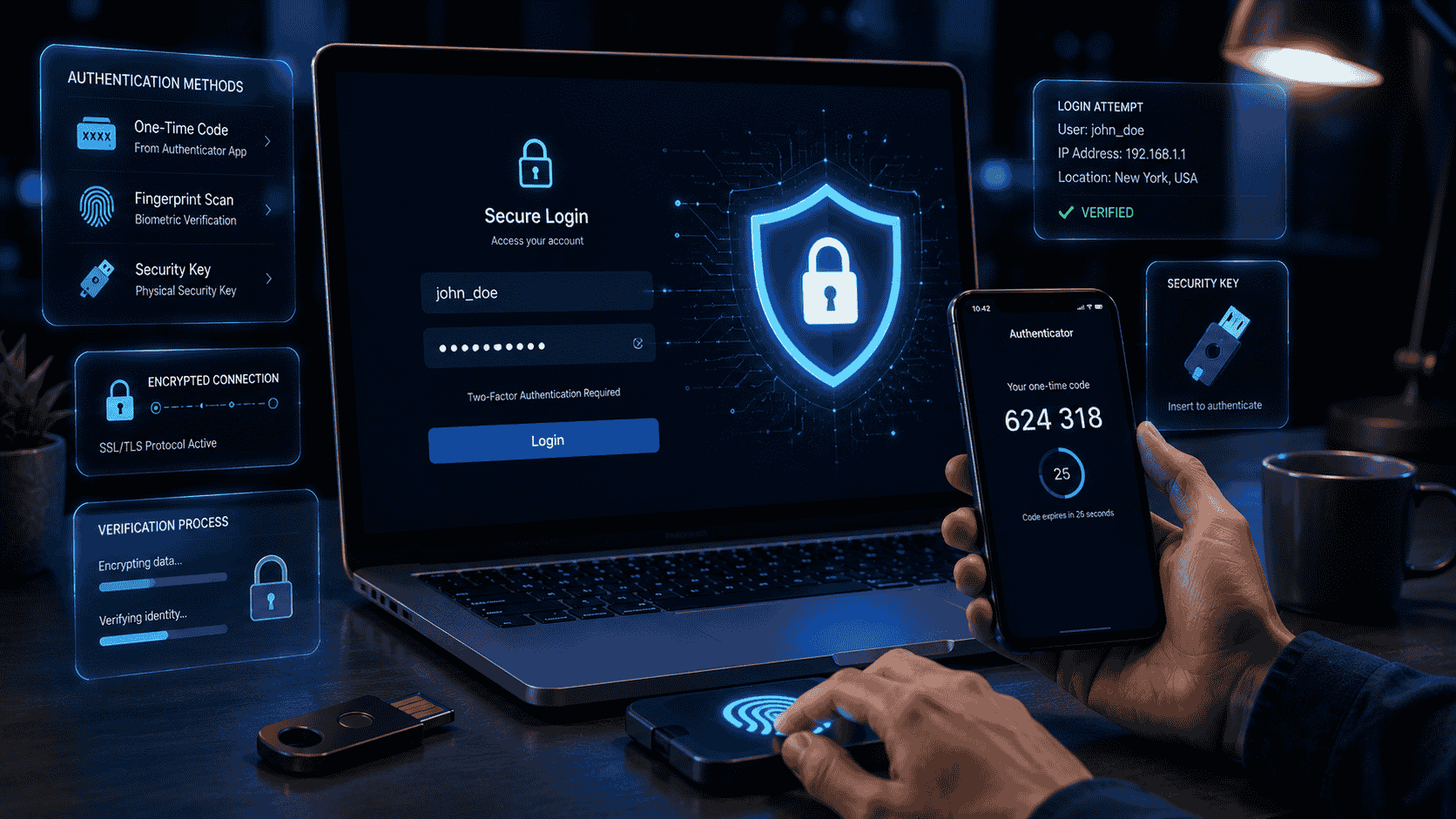
Learn what Two-Factor Authentication (2FA) is, how it works, its benefits, types, and why enabling it is one of the best ways to protect your online accounts.
What Is Two-Factor Authentication (2FA)?
With the increasing shift of our personal and work lives to the internet, safeguarding digital accounts is crucial. Email, social media, online banking, and cloud storage hold sensitive data that cybercriminals target. Although having a strong password is a vital initial measure, relying solely on passwords is insufficient to combat today’s cyber threats.
This is where Two-Factor Authentication (2FA) comes in. Also known as two-step verification or multi-factor authentication (MFA) when additional verification methods are used, 2FA adds an extra layer of security to your accounts. Even if someone steals or guesses your password, they still need a second form of verification before they can sign in.
Basically, Two-Factor Authentication (2FA) is a security feature that requires two different forms of identity verification before granting access to an account or device.
Authentication factors generally fall into three categories:
- Something you know, such as a password or PIN.
- Something you have, such as a smartphone, hardware security key, or authentication app.
- Something you are, such as a fingerprint or facial recognition.
Traditional logins use only the first factor—a password. With 2FA enabled, a second factor is required, making unauthorized access much more difficult.
How Does 2FA Work?
The login process is simple but significantly more secure.
A typical sequence looks like this:
- Enter your username or email address.
- Enter your password.
- The service requests a second verification factor.
- You approve the request or enter the verification code.
- Access is granted.
Even if your password is compromised in a data breach or phishing attack, an attacker usually cannot access your account without the second factor.
Common Types of Two-Factor Authentication
Different services support different forms of 2FA. Some methods provide stronger security than others.
1. Authentication Apps
Authentication apps generate time-based one-time passwords (TOTPs) that refresh every 30 to 60 seconds.
Popular authentication apps include:
- Google Authenticator
- Microsoft Authenticator – https://www.microsoft.com/en-us/security/mobile-authenticator-app
- Authy – https://authy.com/
- 2FAS – https://2fas.com/
These apps work even without an internet connection once configured, making them one of the most recommended forms of 2FA.
2. SMS Verification Codes
Many services send a one-time code via text message after you enter your password.
While SMS-based 2FA is better than using only a password, it is generally considered less secure than authentication apps because attackers may attempt SIM-swapping or intercept messages in certain situations.
3. Email Verification Codes
Some websites send a one-time verification code to your registered email address.
This provides an extra layer of protection, but its security depends on how well your email account itself is protected.
4. Push Notifications
Many apps send a notification to your smartphone asking you to approve or deny a login attempt.
This method is convenient because you simply tap Approve instead of typing a code.
5. Hardware Security Keys
Physical security keys connect through USB, NFC, or Bluetooth and provide one of the highest levels of protection against phishing attacks.
They are widely used by businesses, developers, journalists, and individuals with heightened security needs.
6. Biometric Authentication
Some devices use fingerprints, facial recognition, or other biometric identifiers as the second authentication factor.
Biometrics offer convenience but are usually combined with another factor for maximum security.
Why Is 2FA Important?
Passwords can be compromised in many ways, including:
- Data breaches
- Phishing emails
- Malware
- Password reuse
- Weak passwords
- Credential stuffing attacks
Two-Factor Authentication dramatically reduces the likelihood that attackers can access your account using only stolen credentials.
Even if your password becomes known to someone else, they would still need access to your second authentication factor.
Benefits of Using 2FA
Enabling 2FA offers several important advantages:
- Stronger account security
- Protection against stolen passwords
- Reduced risk of identity theft
- Improved protection for financial accounts
- Greater peace of mind
- Better defense against phishing attacks
- Compliance with many workplace security policies
For most users, the small extra step during login is well worth the increased protection.
Potential Limitations
Although 2FA greatly improves security, it is not perfect.
Some challenges include:
Lost Devices
If you lose your phone or hardware key, you may temporarily lose access to your accounts unless you’ve saved recovery codes or configured backup authentication methods.
SMS Risks
SMS verification can be vulnerable to SIM-swapping attacks, where criminals fraudulently transfer your phone number to another SIM card.
Phishing Attacks
Advanced phishing attacks can sometimes trick users into entering both their password and one-time verification code on fake websites.
Using authentication apps, hardware security keys, and carefully checking website addresses helps reduce this risk.
Best Practices for Using 2FA
To get the most benefit from Two-Factor Authentication:
- Enable 2FA on all important accounts.
- Use an authentication app whenever possible instead of SMS.
- Save backup or recovery codes in a secure location.
- Keep your authentication device protected with a screen lock.
- Never share one-time verification codes with anyone.
- Be cautious of unexpected login approval requests.
- Keep your operating system and apps updated.
Combining 2FA with strong passwords creates a much stronger defense against cyberattacks.
Where Should You Enable 2FA First?
While it’s ideal to enable 2FA everywhere it’s available, prioritize these accounts:
- Email accounts
- Online banking
- Password managers
- Cloud storage services
- Social media accounts
- Shopping websites with saved payment information
- Work accounts
- Cryptocurrency wallets and exchanges
Protecting your email account is especially important because it is often used to reset passwords for other services.
KEYNOTE
1. Is Two-Factor Authentication free?
Yes. Most online services offer 2FA at no additional cost, and many authentication apps are free to download and use.
2. Which type of 2FA is the most secure?
Hardware security keys are generally considered the most secure option, followed by authentication apps. SMS-based verification is still useful but offers less protection against certain attacks.
3. Can I use 2FA without a smartphone?
Yes. Some services support hardware security keys, desktop authentication apps, or printable recovery codes as alternatives.
4. What happens if I lose my authentication device?
Most services provide backup codes or alternative recovery methods. Save these recovery codes in a secure location before you need them.
5. Should I enable 2FA on every account?
Yes, whenever it is available—especially for email, banking, cloud storage, password managers, work accounts, and any service that stores sensitive personal or financial information.

)