What Is a VPN Kill Switch and How Does It Work?
Before you learn What a VPN kill switch is and how it works, it’s helpful to have a basic understanding of how a VPN (Virtual Private Network) works. If you haven’t already, we recommend reading our beginner’s guide to VPNs first – HERE. Understanding how a VPN protects your internet connection, encrypts your data, and helps improve your online privacy will make it easier to understand the importance of a VPN kill switch and how it can help keep your data secure if your VPN connection suddenly drops.
What Does a VPN Kill Switch Do?
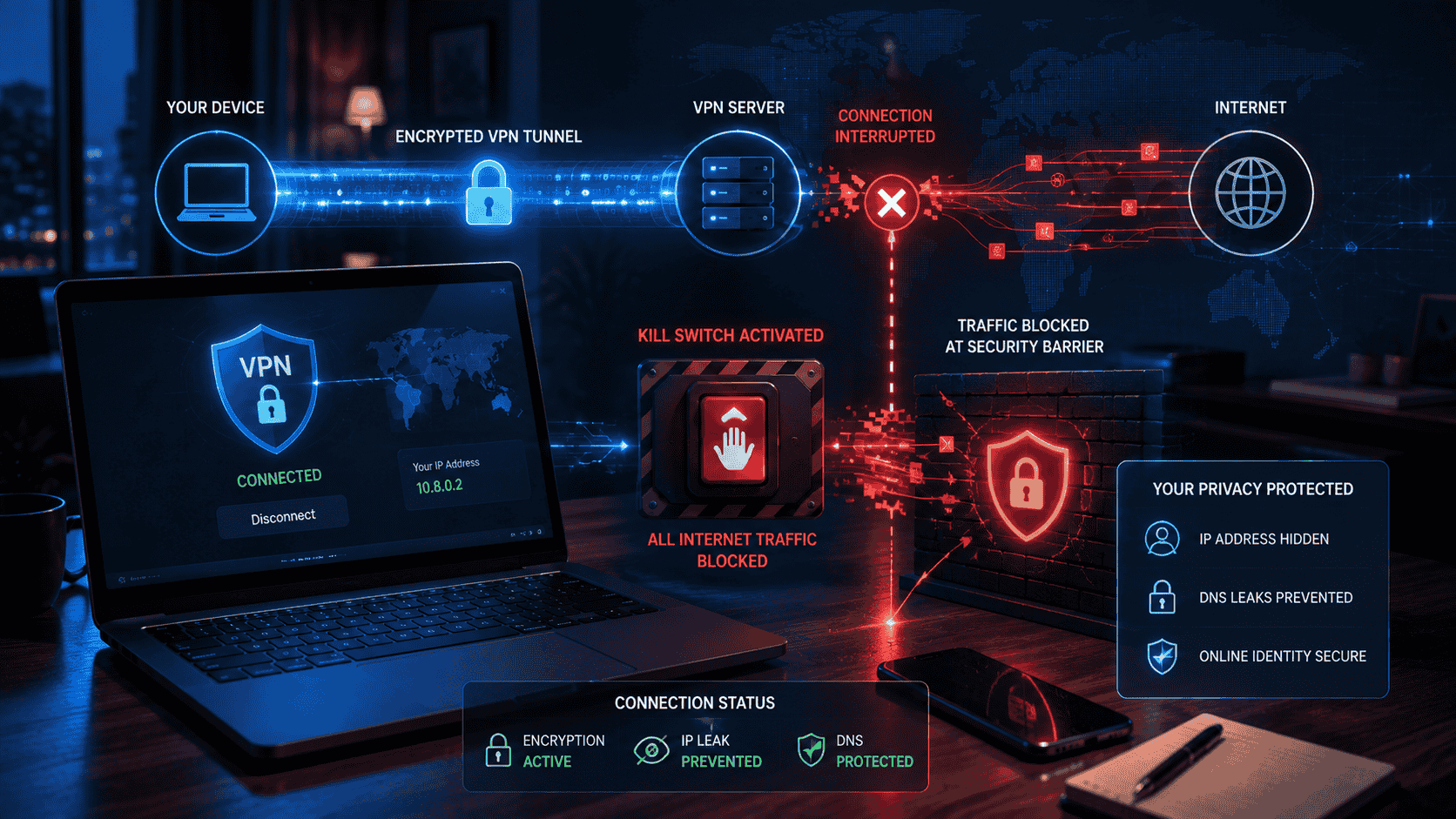
The simplest way to understand a kill switch is to imagine a Safety Gate.
When the VPN is connected:
Internet → VPN tunnel → VPN server → Internet
When the VPN connection suddenly fails due to Network Connection Failing or Network Disconnection:
Internet → BLOCKED
Instead of allowing applications to continue using your normal internet connection, the kill switch prevents network traffic from leaving the device until the VPN connection is restored or the kill switch is disabled.
The purpose is to reduce the chance that your device accidentally communicates over an unprotected connection.
Why Can a VPN Disconnect?
VPN connections can fail for several reasons.
For example:
- Wi-Fi may temporarily disconnect. (This is the most likely reason)
- Mobile network coverage may change.
- The VPN server may become unavailable.
- Your device may switch networks.
- The VPN application may encounter an error.
- Your internet connection may become unstable.
- Your device may enter a power-saving state.
Without a kill switch, applications may automatically reconnect through the normal internet connection.
This can happen without the user immediately noticing.
What Happens Without a Kill Switch?
Imagine that you are connected to a VPN while using public Wi-Fi.
Your VPN connection is active, and your internet traffic is passing through the VPN.
Suddenly, the VPN disconnects.
Without a kill switch, your device may continue accessing the internet through the Wi-Fi network.
Websites could then see your normal public IP address instead of the VPN server’s address.
The exact privacy implications depend on the VPN, application, operating system, and connection.
A kill switch is designed to prevent this type of accidental transition.
Standard and Advanced Kill Switches
Different VPN providers use different terminology.
A standard kill switch generally activates when an existing VPN connection unexpectedly drops.
An advanced or permanent-style kill switch can be stricter.
For example, Proton VPN describes its Advanced kill switch as preventing internet access unless a VPN connection is active.
This means that if you manually disconnect the VPN, internet access can remain blocked until you either reconnect to the VPN or disable the advanced kill switch.
The exact behavior differs between VPN applications, so read the provider’s documentation.
Why Is a Kill Switch Important?
A kill switch is particularly useful when maintaining VPN protection continuously is important to you.
Consider someone using a VPN because they do not want applications to communicate outside the VPN connection.
If the VPN disconnects unexpectedly, the kill switch can prevent those applications from immediately switching to the normal connection.
This can reduce the chance of accidental IP exposure.
Who Should Use a VPN Kill Switch?
A kill switch can be useful for:
Privacy-conscious users.
People using public Wi-Fi.
Users who frequently switch networks.
Remote workers.
People who need consistent VPN routing.
Users concerned about accidental IP exposure.
People using applications where a VPN connection is specifically required.
However, not everyone needs a permanent kill switch.
If you frequently turn your VPN off and expect normal internet access afterward, an advanced kill switch can become inconvenient.
*Kill Switch on Android
Modern Android devices can provide VPN controls that work with supported VPN applications.
Proton VPN’s current documentation explains that its Android kill-switch behavior uses Android’s built-in VPN settings, including Always-on VPN and Block connections without VPN on supported versions.
The exact menu names can vary between Android versions and manufacturers.
A typical process involves:
Open Android Settings.
Go to Network or VPN settings.
Select your VPN.
Enable Always-on VPN if supported.
Enable the option to block connections without the VPN when available.
Do not assume that every VPN application supports every Android feature.
*Kill Switch on Windows
VPN applications may provide kill-switch controls directly inside their settings.
For example, a VPN application may have:
Settings → Connection → Kill Switch
The exact location depends on the provider.
Some services provide different modes, such as standard and advanced kill switches.
Always read the provider’s instructions because enabling a strict kill switch can prevent internet access when the VPN is not connected.
Kill Switch and Split Tunneling
Some VPN applications provide split tunneling, which allows selected applications to bypass the VPN while other applications use it.
This can be useful, but it can interact with kill-switch settings.
For example, Proton VPN notes that kill switch and split tunneling are incompatible on most supported platforms, while Windows has specific support for using them together.
If you use both features, check your VPN provider’s documentation carefully.
Potential Disadvantages
A kill switch can occasionally interrupt your internet access.
For example, if the VPN server disconnects and the application cannot reconnect automatically, the kill switch may block your internet.
You might therefore think your internet connection is broken.
The solution is usually to reconnect the VPN or temporarily disable the kill switch if you intentionally want to use the normal connection.
This behavior is a feature rather than necessarily a malfunction.
How to Test a Kill Switch
If you want to test whether your VPN kill switch works, use a controlled test.
Connect to your VPN.
Then temporarily interrupt the VPN connection through the application or by switching networks.
Check whether internet traffic continues.
A properly configured kill switch should block traffic according to the mode you selected.
Avoid testing with sensitive activities.
You can also consult your VPN provider’s official testing guidance.
Final Thoughts
A VPN kill switch is designed to prevent your device from automatically using the normal internet connection when the VPN connection unexpectedly fails.
It can help reduce the risk of exposing your normal IP address or sending traffic outside the VPN tunnel.
Standard kill switches generally respond to unexpected VPN disconnections, while stricter modes can block internet access unless the VPN is active.
The feature can be particularly useful for people who need consistent VPN protection, but it can also interrupt internet access when the VPN is unavailable.
For the best results, understand how your particular VPN provider implements its kill switch and test the settings before relying on them.
KEYNOTES
What is a VPN kill switch?
It is a security feature that blocks internet traffic when a VPN connection is lost.
Why do I need a VPN kill switch?
It can help prevent your real IP address and other traffic from being exposed when the VPN unexpectedly disconnects.
Does a kill switch slow down my internet?
A kill switch itself is not designed to slow your connection. Its primary function is to block traffic when VPN protection is unavailable.
Can I use a VPN without a kill switch?
Yes. A kill switch is an optional security feature, although it can be useful for users who require continuous VPN protection.
What happens when the VPN disconnects with a kill switch enabled?
Internet traffic may be blocked until the VPN reconnects or you disable the kill switch.
Is a VPN kill switch the same as a VPN?
No. The VPN creates the protected connection, while the kill switch helps prevent traffic from continuing outside that connection when it fails.
Looking for more helpful information? Check out the highlighted links throughout this article for detailed guides, or explore our blog for additional tutorials, expert tips, and useful resources. At AskMyQuestions.com, we provide practical, easy-to-follow content designed to help you learn more, solve common problems, and stay informed.
Visit AskMyQuestions.com and explore more today!