Understanding cPanel: A Beginner’s Guide
What Is cPanel?
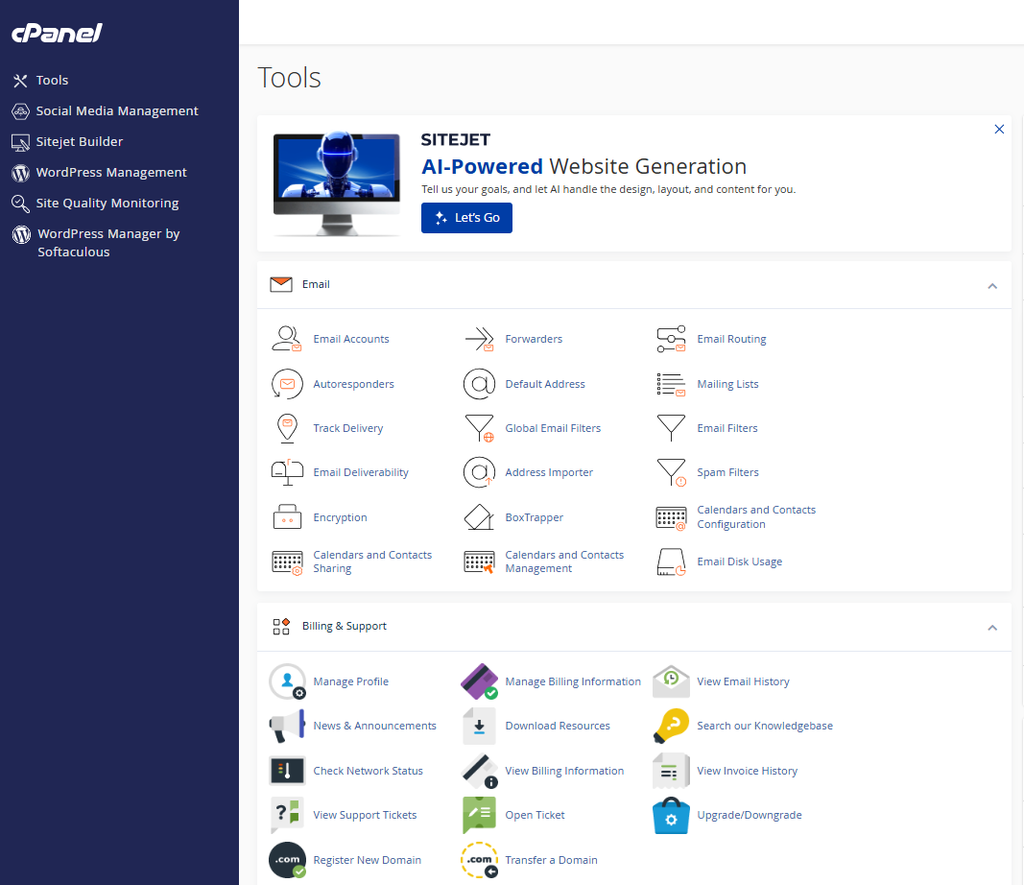
cPanel is a hosting management control panel that allows users to manage their websites and hosting accounts through a browser.
Depending on the hosting provider and account configuration, cPanel may allow users to:
- Manage website files
- Create email accounts
- Add domains and subdomains
- Create databases
- Install website applications
- Manage backups
- Configure security features
- View website statistics
Instead of typing complicated server commands, users can access tools through icons, menus, and forms.
How Does cPanel Work?
When you purchase hosting from a provider that includes cPanel, you are usually given login details for the control panel.
After signing in, you can access different sections based on the features included in your hosting plan.
For example, if you want to upload a website manually, you can open the File Manager and upload your files. If you want to create an email address using your domain, you can use the Email Accounts section.
The exact appearance of cPanel may vary depending on the hosting company and version.
Important Features of cPanel
1. File Manager
The File Manager allows you to view, upload, download, copy, move, and delete website files.
Website files are commonly stored inside a directory such as the main public web folder.
This feature can be useful when making quick changes without using separate FTP software.
2. Domain Management
Depending on the hosting package, cPanel may allow you to manage:
- Primary domains
- Additional domains
- Subdomains
- Redirects
This helps website owners organize multiple web addresses from one hosting account.
3. Email Accounts
If your hosting plan supports email hosting, cPanel can help you create professional email addresses based on your domain.
For example, a business might create addresses for support, sales, or general inquiries.
4. Databases
Many websites and applications use databases to store information.
cPanel often includes tools for creating databases, database users, and managing database access.
Applications such as WordPress commonly use databases to store content and settings.
5. Application Installation
Some hosting providers include software installation tools within cPanel.
These tools can simplify the installation of content management systems and other web applications.
6. Backups
Backups are essential for website security and recovery.
Depending on your hosting setup, cPanel may provide options for downloading backups or restoring certain website data.
However, website owners should not assume that a hosting provider’s backup system is the only backup available. Keeping an independent copy of important website data is a good practice.
Benefits of Using cPanel
One of the biggest benefits of cPanel is its user-friendly interface.
It helps beginners perform common hosting tasks without needing to understand advanced server commands.
Other benefits include:
- Centralized website management
- Easy file handling
- Email management
- Database tools
- Domain controls
- Security features
- Access to backup tools
Is cPanel Free?
cPanel is generally provided through a hosting company or server administrator. Whether you pay for it directly depends on the hosting package you choose.
Some hosting plans include cPanel as part of the service, while server owners may need to obtain the appropriate license.
Tips for Using cPanel Safely
Because cPanel provides access to important website and hosting settings, security is important.
Use a strong and unique password, enable available multi-factor authentication features, avoid sharing your login details, and regularly update your website software.
You should also be careful when deleting files or databases because removing the wrong item could affect your website.
Final Thoughts
cPanel is a powerful but beginner-friendly tool for managing websites and hosting accounts. It brings important functions such as file management, domain settings, email creation, databases, and backups into one dashboard.
For website owners who use hosting that includes cPanel, learning the basics can make website management significantly easier and reduce dependence on technical support for simple tasks.
KEYNOTES
What is cPanel used for?
cPanel is used to manage websites, domains, files, email accounts, databases, and other hosting features.
Do all hosting companies use cPanel?
No. Some providers use cPanel, while others use different hosting control panels.
Can I install WordPress through cPanel?
Many hosting accounts include application installation tools that can help install WordPress.
Is cPanel difficult to use?
No. It is designed with a graphical interface that makes many hosting tasks easier for beginners.
Can I delete website files in cPanel?
Yes, but you should be careful and create a backup before deleting important files.
Looking for more helpful information? Check out the highlighted links throughout this article for detailed guides, or explore our blog for additional tutorials, expert tips, and useful resources. At AskMyQuestions.com, we provide practical, easy-to-follow content designed to help you learn more, solve common problems, and stay informed.
Visit AskMyQuestions.com and explore more today!